
There are three methods to check your JAMB UTME result, and we will reveal all three methods in this article.
After seeing how to check your result, make sure you read the “what next” section to see the next actions you need to take after checking your JAMB UTME result.
Table of Contents
How to Check JAMB UTME Result via SMS
On the same phone number you used to register for the JAMB UTME exam, send a text message using the following format;
Type UTMERESULT and send to 55019 or 66019.
See the image below;
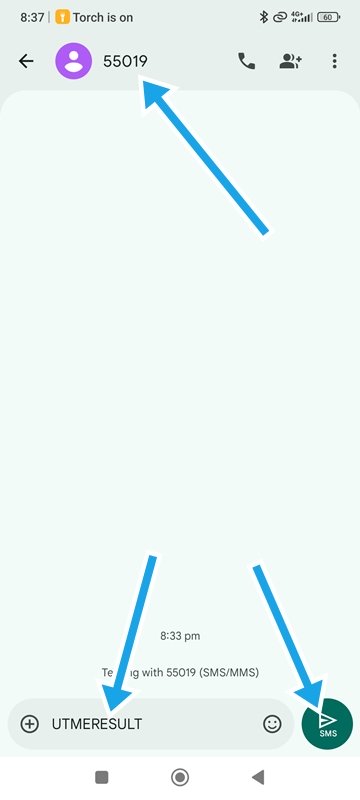
If you have forgotten the phone number you used to register for JAMB, check your JAMB UTME exam slip.
This is the fastest method to check your result because when JAMB releases UTME results, they first activate the SMS result-checking option, while other methods, such as the online portal, usually become available days or even months later.
How to Check JAMB UTME Result with Registration Number
This method is the best option if you have misplaced the SIM card you used to register for the JAMB UTME exam.
Visit the JAMB UTME result checker page here and enter your JAMB registration number or the email address you used to register for JAMB.
Click the check result button to see your JAMB UTME result.
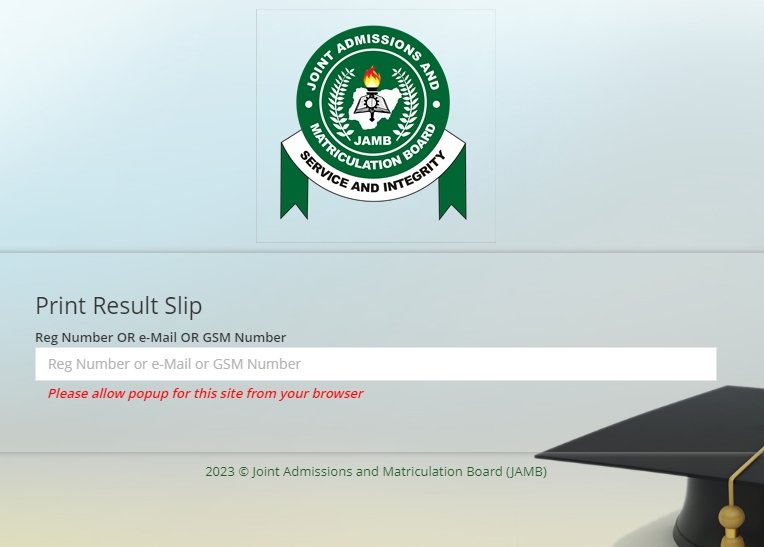
If you see a blank page, it means the portal has not been enabled yet. The third method should work for you.
How to Check JAMB UTME Result on JAMB CAPS
To be able to check your JAMB result on the JAMB portal, you must have linked your email address to your JAMB profile.
When you link your email to JAMB, you will get a password that allows you to log in to your JAMB profile on the official JAMB portal. This password is usually sent to the email address you linked during JAMB UTME registration or via SMS linking.
Follow the steps below to check your JAMB result through JAMB CAPS;
Visit the JAMB efacility portal.
Enter the email address you used to register for JAMB and your JAMB efacility password, then click on login.
If you can’t remember your password, click on “Reset Password” and follow the instructions to create a new one.
Once you are logged in, locate “print result slip” on the left side of the screen.
Make a payment of ₦1,500 and then return to the portal, click the “print result slip” link again and enter your JAMB registration number; your JAMB result will automatically download in PDF format. You can visit a cyber cafe to print it out.
Why you Should Check your JAMB UTME Result Immediately
Apart from checking to see your performance in the exam, there are other reasons why you should check your JAMB UTME result.
Your JAMB UTME result helps you know where you stand. It helps you decide if you need to change your institution or course.
For courses like medicine and surgery, it is risky to apply with a JAMB score below 300. Some schools, like the University of Lagos, do not accept JAMB scores below 200.
Checking your JAMB UTME score on time helps you to make better decisions.
What’s Next?
Check Previous Post-UTME Cut-off Marks
Check the previous Post-UTME cut-off mark for your school of choice, as this will give you an idea of the score you need to be competitive. In most cases, schools rarely change their Post-UTME cut-off marks, so knowing last year’s requirement can help you properly assess your chances of admission and plan accordingly.
Find Out If Your School Will Conduct Post-UTME or Screening
Confirm if your school of choice will conduct a Post UTME exam or if candidates will be screened with their JAMB UTME and O’Level results.
If a Post UTME exam is to be held, you should start preparing early to improve your chances of performing well. However, if the school will only conduct a screening, calculate your screening score using your JAMB UTME and O’Level results to see your chances of meeting the required cut-off mark for admission.
Join School Communities
To stay updated and avoid missing important information about your school of choice, join online communities or groups dedicated to that institution, where updates and announcements are regularly shared.
Make Decisions Fast
Do you need to change your course or institution? Do it as fast as possible so that it won’t delay you from getting the Post UTME form for your school of choice when the form goes on sale.
FAQ
I Can’t Find my Result. What Should I Do?
If you cannot find your JAMB UTME result, it could be as a result of any of these reasons;
1. The results may still be pending release by JAMB at the time you checked. Try checking again or ask in the groups you’ve joined for updates.
2. The JAMB information you entered might be wrong. Confirm that your registration number is correct.
I Misplaced the SIM Card I Used to Register for JAMB. What Should I Do?
Visit your network provider’s service centre to retrieve your SIM card. If it is not possible to retrieve your SIM card, you can still check your JAMB UTME result on the JAMB efacility portal.
I Think I Scored More Than This. Can I Report to JAMB?
Yes, you can report to JAMB. However, you will need to provide valid evidence or documentation to support your claim, and JAMB will review your case before making any adjustments. Keep in mind that result amendments are rarely granted unless there is a clear error in the original scoring.
What is the Password for Checking JAMB Results?
You need the password for your JAMB efacility page. If you have forgotten the password, visit the JAMB efacility page, click the “forgot password” link, enter the email address linked to your JAMB profile and complete the process.
Thank you for reading our article on how to check your JAMB UTME result. If you found this helpful, kindly share it with your friends using the buttons below.
