
The Joint Admissions and Matriculation Board (JAMB) requires every candidate to link a valid and active email address to their JAMB profile to fully access its online services. Whether you are a UTME, Direct Entry (DE), Part-time or Open University candidate, linking your email address to JAMB is mandatory.
By linking your email to JAMB, you gain access to important services such as JAMB CAPS, where you can check your admission status, accept or reject admission offers, and receive official notifications from JAMB (e.g school transfers). Candidates who have not linked their email address to their JAMB profile will not be able to access any of these services.
In this guide, you will learn how to link your email address to your JAMB profile, the requirements needed, and how to avoid common mistakes.
Table of Contents
Who Should Link Their Email Address to JAMB?
Candidates who are attempting the JAMB UTME examination or Direct Entry (DE) for the first time are usually the most affected because, at the point of registration, they do not yet have an active JAMB e-Facility account linked to an email address.
Since they are new applicants, they must link a valid email address to enable JAMB create and activate their e-Facility profile, which is required for accessing JAMB CAPS and other online services.
Returning candidates who registered in the previous year do not need to link because they have most likely done that. They can use their old JAMB efacility profile to apply for admission in the current year.
You may be a returning JAMB candidate, but you created a new profile code with a different phone number in the current year; you need to link your email address to your new profile. It also means you need to create a different email address because you cannot link one email address to multiple JAMB profiles.
Note: Part-time, Open University, Distance Learning and Sandwich candidates are expected to follow the same process to link their email to the JAMB efacility portal.
Requirements for Linking Your Email Address to JAMB
You only need three things to link your email address to JAMB: the phone number you used in registering for JAMB, at least ₦50 airtime and a valid email address.
Once you have any of these, follow the steps below to link your email;
How to Link Your Email Address to JAMB
Send a text message using the phone number you used to register for JAMB in this format;
Email type-your-email type-your-email
Then send as a text message to 55019 or 66019.
See the image below;
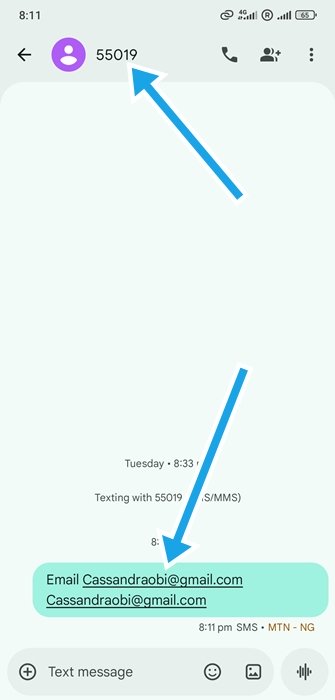
On completion, a password will be sent to your email address.
How to Confirm if your Email has been successfully Linked to JAMB
Visit the efacility link, enter your email address and password, then click the login button. If you can log in, you have successfully linked your email address to JAMB.
However, if you get an invalid email address or password error like in the image below, it means your email address has not been linked, or the password you entered is incorrect.
Please retype your email address and password, ensuring they are correct, and then click ‘Log in’ again. If the problem persists, retry the linking process.
While trying, make sure you have at least ₦50 airtime.
Common Mistakes to Avoid
There are cases where candidates send the wrong email address to JAMB during the linking process. Confirm that the email address is typed correctly before sending to 55019 or 66019.
Open the email address yourself. Do not let CBT attendants open an email for you. If a CBT attendant already created an email for you, make sure you ask for the password. It’s best if you change the password.
A lot of candidates forget the email address linked to JAMB and the password. You can save this information on your phone browser or write it in a notebook.
Note that JAMB passwords are case sensitive; Cand4ab is not the same as cand4ab. Where there’s capital or small letters, type it exactly as it appears.
What Next?
Now that you have linked your email address to JAMB, the next thing you should do is to confirm if your O’Level result has been uploaded to JAMB CAPS. If it hasn’t been uploaded, you should do so as soon as possible.
Don’t forget to join school communities if you haven’t, so you don’t miss out on important information.
FAQ
I Linked the Wrong Email. What Should I Do?
If you linked the wrong email address and the linking was successful, you might not be able to change the email address. However, you can try creating the email address you linked to JAMB. For example, if you linked [email protected] instead of [email protected], visit Gmail and try opening a new email account with [email protected].
Can I Change My Email Address after Linking it?
No, you cannot change your email address.
Can I Change My Password to Something I Can Easily Remember?
Yes, you can change the default password sent to you.
Did you find our article on how to link email address to JAMB helpful? If yes, kindly share with your friends using the share buttons below.
